發表文章

目前顯示的是有「BLE」標籤的文章

[LabVIEW][Arduino] Read/Write data between BLED112 dongle and ESP32/在BLED112適配器和ESP32間讀寫資料

圖片
This example shows how BLED112 dongle receive data from ESP32 development board and then send data back to ESP32 and print data on the COM port monitor. 這個範例說明BLED112 dongle如何從ESP32開發版上收取資料,以及將資料送回ESP32並將資料列印在串列埠監控視窗上。 The next video will show to edit Labview program of BLED112 and Arduino code of ESP32. 下一個影片我們將說明如何轉寫BLED112的LabVIEW程式,以及ESP32的Arduino程式碼。 1. Introduce LabVIEW example code of BLED112 dongle and Arduino code of ESP32 development board. 2. BLE Scan and connection between BLED112 and ESP32. 3. Find Service UUID and Characteristic UUID Rx/Tx of ESP32 in LabVIEW program. Next video will shows how BLED112 dongle reads and write string to ESP32. 1. 簡介BLED112 dongle的LabVIEW程式內容和ESP32開發版的Arduino程式碼。 2. BLED112 and ESP32之間的低功號藍芽掃描與連結。 3. 在LabVIEW程式中找到ESP32的Service UUID和Characteristic UUID Rx/Tx。 下一個影片將說明BLED112 dongle何和讀寫字串到ESP32開發版上。 1. Add while loop in LabVIEW code to read/write data to ESP32 continuously. 2. Convert unit8 value to 3 digits ASCII code in LabVIEW code. 3. Wr...

[AI2][Arduino][ESP32] Classic Bluetooth connection between ESP32 and AI2 App/傳統藍芽傳輸使用ESP32與AI2

圖片
This example demonstrates how to use the classic Bluetooth of ESP32 to read and write data from App created by App Inventor 2. 這個範例說明如何使用經典的藍芽連線方式,在ESP32開發版與App Inventor 2開發出來的 App間進行資料的讀寫。 1. Upload SerialToSerialBT code to ESP32 DevKitc_V4 2. Input string to the serial port monitor to transmit data to App. 3. Input a string to the Write Textbox and tap the Write Button in the App to send data to ESP32 board. 1. 上傳SerialToSerialBT.ino程式碼到ESP32 DevKitc_V4開發版 2. 在Arduino串列埠監控視窗輸入文字,傳送到App中。 3. 在App的 寫入文字方塊中輸入文字,按下寫入的按鈕,將資料傳輸到ESP32開發版上。 In the next video, I will demonstrate how to implement the classic bluetooth app by using App Inventor 2. 下一個影片,我們將展示如何使用App Inventor 2寫一個經典藍芽傳輸的App。 1. Start new project to create designer and blocks windows 開啟新專案建立designer與block視窗 2. Place ListPicker for displaying address and name of bluetooth and Label for showing the result of connection 放置ListPicker顯示藍芽的地址以及名稱,放置Label顯示藍芽連線的結果。 3. Place buttons and texboxes for reading and writing texts 放置讀與寫的按...

在Arduino IDE安裝ESP32 Add-On

圖片
為了在Arduino上開發ESP32的開發版,我們需要在Arduino IDE上裝ES32 Add-On, 安裝Arduino IDE1.8.9  1. 到  https://www.arduino.cc/en/Main/Donate  下載Arduino IDE,選just download即可。 2. 安裝Arduino IDE 2. 安裝ESP32 Add-On 在Arduino IDE中,檔案-->偏好設定,再額外的開發版管理員網址中輸入: https://dl.espressif.com/dl/package_esp32_index.json 按確定。 在Arduino IDE中,工具-->開發版-->開發版管理員,搜尋 ESP32, 然後安裝 ESP32 by Espressif Systems 選擇ESP32 Devkit開發版 開啟範例WIFI scan 執行,開啟工具-->串列埠監控視窗,即可看到附近WIFI訊號的掃瞄資訊 參考 ESP32-DevKitC V4 Getting Started Guide ( https://docs.espressif.com/projects/esp-idf/en/latest/get-started/get-started-devkitc.html )

使用BLE Dongle (BLED112)與LabVIEW BLE Toolkt遭遇的問題

圖片
2018.02.25 目前想使用BLED112與LabVIEW BLE Toolkit與BLE M+Arduino作結合,想Read與Write資料, 雖然這個BLE Module與App Inventor 2的資料讀寫,已經證實可行, 但在與BLED112與LabVIEW BLE Toolkit的搭配上卻還有這一些問題, 首先是Characteristic UUID與Service UUID無法被發現: Error 0 occurred at Client Characteristic Configuration for Service: 0000FFF0-0000-1000-8000-00805f9b34fb and Characteristic 0000FFF1-0000-1000-8000-00805f9b34fb was not found 另一個可能是Notify沒被Enable, 有個論壇中的回覆是這樣描述的: I enabled notifications for the TI sensortag cc2650, sequence: 1. Write 0x01 to sensor configuration UUID to enable data collection [temperature sensor AA02, humidity sensor AA22, ...]. 2. Write 0x0100 to sensor notification UUID 2902. 3. Monitor the attribute value event [use ble_evt_attclient_attribute_value.vi in the above toolkit] 目前只能試到如此,之後在程式是否能解決上述問題,如無法解決,只好試試他BLE Module了。 2019.02.28 測試另一個可以讀到 Device Name的BLE模組,發現這個模組可以看到 Handle Table,而之前的BLE模組卻沒有Handle Table,這是要保留探討的部分。 我們暫時將可以抓到Handle Table的BLE模組稱為BLE.B,而原先的稱為BLE.A,以下是BLE.B的Handle Ta...

(下) BLE (Bluetooth Low Energy) Toolkit for LabVIEW (低功耗藍芽工具套件)

圖片
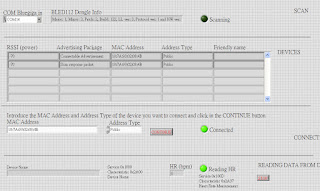
將LabVIEW更新到2014版後,新買的BLE Dongle也到貨了,接下來要完成LabVIEW BLE Toolkit的安裝,以及BLE Dongle Driver的安裝。 使用VIPM安裝完BLE Toolkit,接著按下Show Examples按鈕,      可選擇以下三個VI來測試,      ble_scan_devices.vi Discover and connect to BLE devices ble_read_write_characteristics.vi Read and Write a Characteristic value, providing the  UUID  for  Service  and  Characteristic ble_read_hr_monitor.vi  Acquire Heart Rate data stream, for devices with Heart Rate Profile 執行 ble_read_hr_monitor.vi,

(上) BLE (Bluetooth Low Energy) Toolkit for LabVIEW (低功耗藍芽工具套件)

圖片
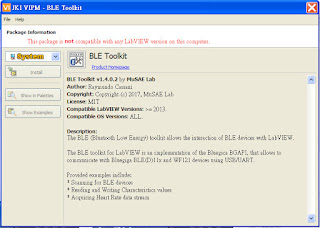
之前使用過 App inventor開發過BLE App,但實在是有不方便的地方 例如Debug的部分, 最近翔從 LabVIE來實現與BLE的溝通,於是搜尋相關資訊,發現LabVIEW有提供相關的套件, 1. 下載資訊: Communicate with Bluetooth Low Energy (BLE) Devices in LabVIEW https://knowledge.ni.com/KnowledgeArticleDetails?id=kA00Z0000019LuHSAU 2. 低功耗藍芽工具套件下載處 BLE-Toolkit-LabVIEWriu https://github.com/MuSAELab/BLE-Toolkit-LabVIEW 3. 使用VIPM安裝 套件內容: BLE Toolkit v1.4.0.2 by MuSAE Lab Author: Raymundo Cassani Copyright: Copyright (c) 2017, MuSAE Lab License: MIT Compatible LabVIEW Versions: >= 2013. Compatible OS Versions: ALL. Description: The BLE (Bluetooth Low Energy) toolkit allows the interaction of BLE devices with LabVIEW. The BLE toolkit for LabVIEW is an implementation of the Bluegica BGAPI, that allows to communicate with Bluegiga BLE(D)11x and WF121 devices using USB/UART. Provided examples indlude: * Scanning for BLE devices * Reading and Writing Characteristics values * Acquiring Heart Rate data stream 由於目前使用的LabVIEW版本太舊,需要更新, ...