發表文章

目前顯示的是有「labview」標籤的文章

大家都用 AI 寫 Code 了,還需要學 LabVIEW 嗎?一個資深工程師的真心話

圖片
  這幾年不論是參加技術論壇,還是帶新進工程師,我最常被問到的一個問題就是: 「學長,現在 ChatGPT、GitHub Copilot 寫 Python、C++ 那麼厲害,動口不動手就能生出幾百行代碼。在這種 AI 時代,我花時間去學一個要用滑鼠連連看的 LabVIEW,真的還有必要嗎?」 這是一個非常尖銳、也極具現實意義的好問題。身為一個在產線、實驗室和儀控領域摸爬滾打多年的資深 LabVIEW 工程師,我不想盲目地告訴你「LabVIEW 天下第一」,但也不認為它會在短期內被 AI 的浪潮輕易吞噬。 今天這篇文章,我不偏袒任何一方,純粹從 產業現實、技術本質以及職涯發展 的角度,來聊聊學習 LabVIEW 在如今究竟還有沒有必要性。 💻 認清現實:AI 衝擊了什麼?又留下了什麼? 首先我們必須承認,生成式 AI 對傳統「文字型程式語言(如 Python)」的初階代碼撰寫,帶來了毀滅性的效率提升。以前要寫一個網頁爬蟲、一個資料庫連線,可能需要查半天技術文件;現在對 AI 下一句話,10 秒鐘就搞定了。 但是,當戰場轉移到 「自動化測試、工業儀控、軟硬體整合」 時,AI 就會面臨以下幾個巨大的坎: 1. 「文字模型」與「圖形化語言」的天然隔閡 目前的 AI 大模型本質上是處理「文字(Token)」的。Python 的代碼是文字,AI 很好理解;但 LabVIEW 的底層是圖形化的資料流(G 語言)。雖然現在有官方的 NI Nigel AI 或第三方的腳本工具,可以透過文字指令來自動拉線,但只要程式結構一複雜,AI 在視覺化邏輯的布局、記憶體優化上,錯誤率依然偏高。 2. AI 無法通靈「實體硬體的物理特性」 在軟硬體整合的世界裡,寫完程式通常只完成了 30%,剩下的 70% 都在 「Debug(除錯)」 。 為什麼這個 DAQ 卡讀出來的電壓有漣波(Ripple)? 為什麼儀器用 VISA 通訊時,每跑三小時就會因為時基(Timing)卡死一次? 產線上的實體接線有沒有雜訊干擾? 這些牽涉到電路、物理訊號、機械結構的現場問題,AI 看不到、摸不到,也無法通靈。此時,工程師在現場的「硬體調校經驗」,才是決定專案能不能結案的關鍵。 ⚖️ 兩面刃:學與不學的理性得失 要不要學 LabVIEW,取決於你想走什麼樣的職涯路徑。我們不妨把正反兩面的利弊攤開來看: 🛑...

不用再瘋狂連連看!3款超實用的 LabVIEW AI 寫程式工具盤點(含官方與第三方免費試用攻略)

圖片
在自動化測試和儀控領域,大家過去對 LabVIEW 的印象不外乎是「用滑鼠在 Block Diagram 上瘋狂拉線、連連看」。隨著 ChatGPT、GitHub Copilot 的普及,許多文字型程式語言(如 Python、C++)都已經能用 AI 快速生成代碼。此時,許多 LabVIEW 工程師不禁要問: 「難道只有我們要繼續手動拉線嗎?有沒有 AI 可以幫忙寫 LabVIEW VI 程式碼?」 答案是: 有的!而且現在技術已經非常成熟! 這篇文章將為大家盤點目前市面上最主流、且 提供免費試用方案 的 3 款 LabVIEW AI 開發工具,教你如何利用 AI 省下大量的滑鼠工時,告別滑鼠手! 🛠️ 運作原理:AI 是怎麼幫 LabVIEW 連線的? 因為 LabVIEW 屬於圖形化資料流語言(G 語言),底層是二進位檔案,AI 無法像提供文字代碼那樣直接「畫」一張圖給你。 現行的 AI 工具主要是透過 VI Scripting(程式碼腳本化技術) 。簡單來說,你用自然語言(文字)下指令,AI 會在背後將指令轉譯成 LabVIEW 看得懂的腳本指令,進而控制 LabVIEW 開發環境, 在你的畫面上自動拖出結構、放上元件,並把線完美的連好! 🔍 3 大 LabVIEW AI 工具與免費試用方案盤點 1. 官方旗艦:NI Nigel™ AI 這是 NI(National Instruments)官方推出的重磅功能,內嵌在 LabVIEW 開發環境中。它結合了 Azure OpenAI 大模型與 NI 累積 50 年的硬體知識,專為測試與量測工作流設計。 核心功能 :輸入提示詞就能自動建立與串接 VI、自動補全程式碼。它最厲害的地方在於 深諳硬體配置 (如 DAQmx、VISA 儀器控制),還能幫你做 Legacy VI 的代碼審查與邏輯分析。 🎁 免費試用方案 : 7 天本地完整試用 :前往 NI 官網點擊申請開通 LabVIEW Free Trial 權限,下載安裝最新的評估版(含 Nigel AI 助手)。 7 天雲端免安裝沙盒 :不想下載好幾 GB 的軟體?NI 官方也提供 Web-based 的線上沙盒環境,免安裝就能直接在網頁上體驗 Nigel AI。 2. 生態黑馬:AI Agent for LabVIEW (VIRobotics 威視銳) 由...

[第28期] LabVIEW Queued Message Handler tutorial/LabVIEW佇列訊息處理器教學

圖片
This video shows how to use the design pattern of Queued Message Handler for programming in LabVIEW, including: 1. Use QMH Template when create project 2. Use Refnum (point) to read/write data transfer 3. Use dynamic event to send data 這個視頻說明如何在LabVIEW使用佇列訊息處理器的設計模式來撰寫程式,包含: 1. 建立專案時使用QMH模板 2. 使用參考(指標)讀寫數據 3. 使用動態事件傳遞數據

[Note 5] 使用NI package manager安裝Vision Development Module(VDM) 2021/Install Vision Development Module with NI package manager

圖片
由於在更新LabVIEW 2021後,Vision Development Module (VDM)也要更新到2021年版,在NI的網站無法下載到軟體,因此我使用NI Package Manager來安裝VDM軟體。 安裝的過程如下:

[第12期]Migrate LabVIEW to Python: Use Expression Node and Math library/使用Expression Node和Math函式庫

圖片
This video shows how to use mathematical functions in LabVIEW and Python. We introduce Expression Node for non-conplex data type calculation in LabVIEW and applications of Math library in Python. Some examples (conversion of degree and radian, the plot of sine wave etc.) are provided for the demonstration of Expression Node and Math library in LabVIEW and Python respectively. 本視頻說明如何在LabVIEW和Python中使用數學函數。 我們介紹LabVIEW的Expression Node來處理簡單的資料型態,以及Math函數庫在Python中的應用。 我們也提供的一些範例,如角度與弧度間的轉換、Sine波的繪製,來說明Expression Node和Math函數庫分別在與Python中應用。 References: 1. Expression Node ( https://zone.ni.com/reference/en-XX/help/371361R-01/glang/expression_node/ ) 2. math数学函数 ( https://docs.python.org/zh-tw/3.7/library/math.html#angular-conversion )

[第11期]Migrate LabVIEW to Python: read file to XY graph/使用Python改寫LabVIEW程式: 讀檔輸出XY圖

圖片
This video shows how to migrate LabVIEW to Python. Examples of reading file to XY graph are demonstrated by using LabVIEW and Python. Content: 1. Read file and plot XY graph with LabVIEW 2. Read file and plot XY graph with Python 本視頻說明如何使用Python改寫LabVIEW程式,分別使用LabVIEW與Pyhon寫出讀檔輸出XY圖的範例來說明。 內容: 1. LabVIEW讀檔並繪製XY圖 2. Python讀檔並繪製XY圖

[第6期]Write LabVIEW VISA program to control Dobot Magician/撰寫LabVIEW VISA程式來控制Dobot Magician

圖片
  This video shows how to control Dobot Magician by writing LabVIEW VISA program. The content includes: 1. Protocol description of PTP mode command 2. Write Protocol by VISA to control Dobot Magician 這個視頻說明如何撰寫LabVIEW VISA程式來控制Dobot Magician。 內容為: 1. 通訊指令說明 (PTP mode command) 2. 用VISA寫傳輸指令來控制Dobot Magician 參考資料/References: 1. Dobot Communication Protocol https://www.dobot.cc/downloadcenter/dobot-magician.html?sub_cat=72#sub-download 2. Communicating with the Dobot Magician using raw protocol https://jacquesjohnston.wordpress.com/2019/01/29/communicating-with-the-dobot-magician-using-raw-protocol/

[第5期]Dobot Magician robotic arm Introduction/Dobot Magician機器手臂簡介

圖片
This video gives the brief introduction of Dobot Magicain robotic arm and provides some documents and resources. 這個視頻提供簡單的Dobot Magician機器手臂的簡介,以及一些文件與資源。 Content: 1. Software & Driver Installation 2. Documents & Resources 內容如下: 1. 軟體與驅動程式的安裝           2. 文件與資源  References: 1. CH340 Drivers for Windows, Mac and Linux https://sparks.gogo.co.nz/ch340.html 2. Magician Studio v1.9.4 https://www.dobot.cc/downloadcenter/dobot-magician.html?sub_cat=70#sub-download 3. Dobot Magician User Manual https://iptech1.com/pdf/Dobot-Magician-User-Manual.pdf 4. Dobot Communication Protocol, Dobot Demo https://www.dobot.cc/downloadcenter/dobot-magician.html?sub_cat=72#sub-download 5. Hands-On Introduction to LabView with the Dobot Magician https://www.dobot.us/download/hands-on-introduction-to-labview-with-the-dobot-magician/# 6. Communicating with the Dobot Magician using raw protocol https://jacquesjohnston.wordpress.com/2019/01/29/communicating-with-the-do...

[第4期]使用LabVIEW視覺模組擷取Webcam影像與存檔/Use LabVIEW Vsion Module to grab and save the image of the camera

圖片
本影片在說明如何使用LabVIEW視覺模組擷取Webcam影像並存檔 This video shows how to use LabVIEW Vsion Module to grab and save the image of the camera 大綱/Outline: 1. 安裝機器視覺開發模組 Install Vision Development Modul (VDM) 2. 安裝機器視覺擷取軟體 Install Vision Acquisition Software (VAS) 3. 讀取Webcam影像 Read Image from webcam 4. 將Webcam影像寫入檔案 Write Image to file

[第2期]使用LabVIEW Python Node與OpenCV來讀取圖片/Use LabVIEW Python Node and OpenCV to read image

圖片
本影片介紹如何使用LabVIEW Python Node與OpenCV來讀取圖片。 This video shows how to use LabVIEW Python Node and OpenCV to read image. 步驟 Steps: 1. 使用命令提示字元安裝OpenCV Install openCV in Comand Prompt 2. 完成OpenCV讀取圖片的函數 Complete ReadImage() function 3. 用Python Node呼叫讀圖的函數 Call function by Python Node

[LabVIEW] Get stock data from yahoo finance by LabVIEW/使用LabVIEW獲取yahoo財經上的股票資料

圖片
  This example shows how to use LabVIEW to get stock data from yahoo finance 這個範例說明如何使用LabVIEW擷取yahoo財經上的股票資料 1. get yahoo finance data by using LabVIEW 使用LabVIEW擷取Yahoo財經的資料 2. Use HTTP Client VIs to get web content 使用HTTP Client的VIs來獲取網頁內容 3. Determine the data range you want to get 決定想要獲取的資料範圍 4. Select data range by using Match Pattern VI 使用Match Pattern VI選擇資料範圍 5. Find one row data by using Match Pattern VI 使用Match Pattern VI尋找一列資料 6. Find add row data by using Match Pattern VI 使用Match Pattern VI尋找所有列資料 7. Send all array data to Multi Listbox 將陣列資料送到Multi Listbox

(下) BLE (Bluetooth Low Energy) Toolkit for LabVIEW (低功耗藍芽工具套件)

圖片
將LabVIEW更新到2014版後,新買的BLE Dongle也到貨了,接下來要完成LabVIEW BLE Toolkit的安裝,以及BLE Dongle Driver的安裝。 使用VIPM安裝完BLE Toolkit,接著按下Show Examples按鈕,      可選擇以下三個VI來測試,      ble_scan_devices.vi Discover and connect to BLE devices ble_read_write_characteristics.vi Read and Write a Characteristic value, providing the  UUID  for  Service  and  Characteristic ble_read_hr_monitor.vi  Acquire Heart Rate data stream, for devices with Heart Rate Profile 執行 ble_read_hr_monitor.vi,

(上) BLE (Bluetooth Low Energy) Toolkit for LabVIEW (低功耗藍芽工具套件)

圖片
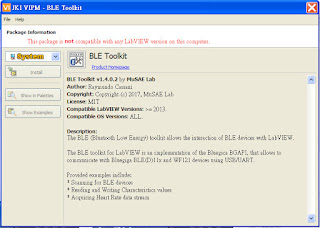
之前使用過 App inventor開發過BLE App,但實在是有不方便的地方 例如Debug的部分, 最近翔從 LabVIE來實現與BLE的溝通,於是搜尋相關資訊,發現LabVIEW有提供相關的套件, 1. 下載資訊: Communicate with Bluetooth Low Energy (BLE) Devices in LabVIEW https://knowledge.ni.com/KnowledgeArticleDetails?id=kA00Z0000019LuHSAU 2. 低功耗藍芽工具套件下載處 BLE-Toolkit-LabVIEWriu https://github.com/MuSAELab/BLE-Toolkit-LabVIEW 3. 使用VIPM安裝 套件內容: BLE Toolkit v1.4.0.2 by MuSAE Lab Author: Raymundo Cassani Copyright: Copyright (c) 2017, MuSAE Lab License: MIT Compatible LabVIEW Versions: >= 2013. Compatible OS Versions: ALL. Description: The BLE (Bluetooth Low Energy) toolkit allows the interaction of BLE devices with LabVIEW. The BLE toolkit for LabVIEW is an implementation of the Bluegica BGAPI, that allows to communicate with Bluegiga BLE(D)11x and WF121 devices using USB/UART. Provided examples indlude: * Scanning for BLE devices * Reading and Writing Characteristics values * Acquiring Heart Rate data stream 由於目前使用的LabVIEW版本太舊,需要更新, ...