發表文章

[LabVIEW] Customized Menu and Event Structure /客製化Menu與事件結構

圖片
Use Run-Time menu to interact with Event Structure 使用Run-Time Menu與事件結構做互動 以下影片是說明如何操作Run-Time Menu來做一格客製化的Menu bar,並在Event Structure中使用Menu操作時的訊號來做字串顯示的互動。   未來會陸續更新影片,讓想學習LabVIEW的朋友可以看影片學習,歡迎訂閱此頻道。

LabVIEW教學: 如何在VI中使用.dll檔

圖片
由於許多的軟體都提供SDK給開發者使用,因此可以在VI中呼叫dll檔使用,一般有兩種方法: 1.  Import  Shared Library 2.    Call Library Function Node 以下是相關的教學連結: 1.  我要如何使用 LabVIEW 來呼叫動態連接函式庫 (Dynamic Link Library DLL)? 2.  Using Shared Libraries in LabVIEW

[3C] 榮耀手環5 血氧、睡眠與運動功能體驗 Honor band 5: Sleep, SpO2, and Workout experience

圖片
由於榮耀手環 5推出了血氧功能,這是在1000元左右的智慧手環中有血氧功能的,於是我便取得了一支來體驗。 Honor Band 5 launched its first SpO2 detection function with the price lower than 33 USD. I got one to experience some new functions. 榮耀手環5是可以換錶盤的,不過我使用的運動健康App找不到這功能,就僅能用手環內建的錶盤進行選擇。 One of new functions is to change face of  Honor Band 5. But I can not find any face change function in my Health App. I just select faces built in Honor Band 5. 榮耀手環5貼靠手脘的部分是曲面的,光學元件的部分較不突出,戴起來感覺比較舒適些。  Honor Band is comfortable to wear because its curve shape design.   接下來介紹幾個我常用的功能: I introduce some functions I usually use.   1. 睡眠偵測: 可以提供深睡、淺睡與REM的分布,會提供分析,告訴使用者哪一個階段的會棉是否正常,以及提供建議。 1. Sleep detection: This function can provide  distribution of Deep Sleep, Light Sleep, REM and Awake and analyze sleep data to provide recommendation for improving sleep quality. 2. 在鍛鍊部分,我喜歡用自由訓練的功能,可以在運動前啟動,然後記錄每秒的心律,不需依賴手機的連結,我覺得很方便。 2. Workout: I like to use Free Training function. You should start this...

在VS code中安裝Python套件virtualenv

圖片
在Python的開發中,通常會使用 VirtualEnv,將系統的Python環境複製一份到VirtualEnv建立的資料夾,以便管理執行環境,以及開發不同應用程式的套件管理。 安裝VirtualEnv 的指令如下: pip install virtualenv 在D槽建一個pydemo資料夾,並切換到該資料夾目錄 cd D:\pydemo 或是 cd D:\ mkdir pydemo cd pydemo 下指 令建立 虛擬環境的工程目錄   virtualenv --no-site-packages .venv PS D:\pydemo> virtualenv --no-site-packages .venv Using base prefix 'c:\\users\\xxxxx\\anaconda3'   No LICENSE.txt / LICENSE found in source New python executable in D:\pydemo\.venv\Scripts\python.exe Installing setuptools, pip, wheel... done. 將目前power shell的環境切換到虛擬環境之中 PS D:\pydemo> . ./.venv/Scripts/activate.ps1 (.venv) PS D:\pydemo> .venv資料夾的內容 參考文件: 1.  在 Visual Studio Code 中配置 Python Flask 环境   ( https://segmentfault.com/a/1190000012149680 ) 2.  Python with VirtualEnv ( https://dotblogs.com.tw/mystic_pieces/2018/11/01/232938 ) 3.  Git 教學:終端機及常用指令介紹 ( https://gitbook.tw/chapters/command-line/command-line.html )

在VS code IDE中查詢Python安裝的套件

圖片
在VS code IDE中查詢Python安裝的套件,在Terminal中輸入 pip list 即會出現已安裝的套件清單

使用VS code開發Python程式 - Matplotlib繪圖

圖片
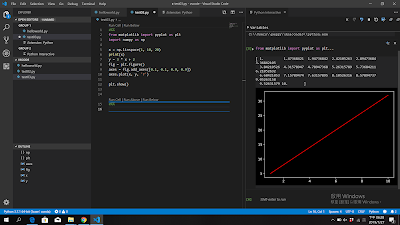
這一篇為如何在VS code的IDE 中用python開發matplotlib, 程式碼如下: #%% from matplotlib import pyplot as plt import numpy as np x = np.linspace( 1 , 10 , 20 ) print (x) y = 3 * x + 2 fig = plt.figure() axes = fig.add_axes([ 0.1 , 0.1 , 0.9 , 0.9 ]) axes.plot(x, y, 'r' ) plt.show() #%% 使用#%%會出現Run Cell字樣,按下Run Cell,可以執行Python Interactive視窗,

開發Python 使用 Visual Studio Code + Anaconda

圖片
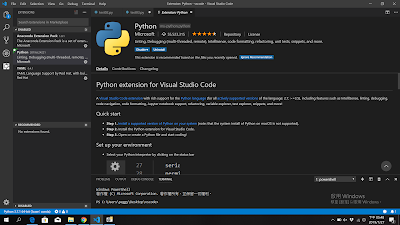
由於Pycharm需要付費,因此嘗試了 Visual Studio Code加上Anaconda 來開發python程式, 可以先下載 VS  Code ( https://code.visualstudio.com/ ) 然後下載 Anaconda ( https://www.anaconda.com/distribution/ ) 安裝完VS Code後,安裝Python extension for VS Code, 接著安裝Anaconda,然後在環境變數中設定 D : \Anaconda 3 D : \Anaconda 3 \Scripts D : \Anaconda 3 \Library \b in 如果python.exe的路徑有問題,可以在 檔案 -> 首選項 -> 設定 -> python.pythonPath 中去設定 建立第一個Python程式可以參考:  https://code.visualstudio.com/docs/python/python-tutorial 先建立一個資料夾,再新增一個helloworld.py到資料夾中, 在helloworld.py寫上 print ( "hello" ) 後按右鍵出現下拉視窗,選擇" Run Python File in Terminal" PS C:\Users\xxxxx\Desktop\vscode> & C:/Users/xxxxx/Anaconda3/python.exe c:/Users/xxxxx/Desktop/vscode/helloworld.pyesktop/vscode/helloworld.py hello